Закрыть
×
dir.by
Праздники ...
Праздники ...
День города Минска (2-ая суббота сентября) (9 и 10 сентября 2023)
Концерты, выставки ...
Концерты, выставки ...
Полина Гагарина|||г. Минск 10 октября 2026
Афишу
Спорт занятия ...
Спорт занятия ...
Фитнес занятия (аэробика, йога и другое)
Спорт занятие
Компьютер, программы...
Компьютер, программы...
Объявления ...
Объявления ...
Оптовые поставки сахара от производителя Хохольский сахарный комбинат
Объявление
Новости ...
Новости ...
Форум ...
Форум ...
обсуждение...
Поиск
Концерты
Спорт
Форум
Компьютер
Компьютер, программы
→
Java
→
Spring in Java (Spring Framework, Spring Data, Spring Boot, ...)
Connect to the application Azure Web App (Java) via FTP | use File Explorer
посмотрели
2900
раз
обновлено: 14 April 2025
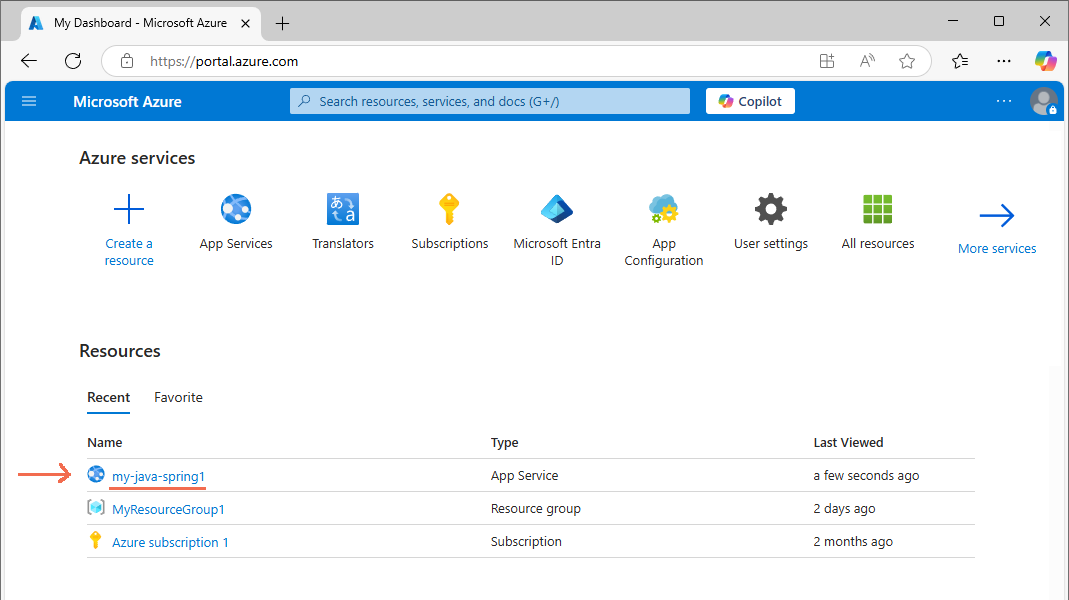
Step 1. Go to the Azure website
Open
https://portal.azure.com
and enter your
Microsoft Account
Step 2. Look at the ftp path, user name, password
I select the application
Azure
Let's look at the path
ftp, user name, password
:
Step 3. Connect via FTP to Azure using File Explorer
Open
File Explorer
Enter the path
ftp, user name, password
:
As a result, we are connected and see the files in
Azure
:
Note!
Error!
FTP Folder Error
Windows cannot access this folder. Make sure you typed the file name correctly and that you have permission to access the folder.
Details: The connection with the server was reset
Decision!
You need to allow full access to
ftp
like this:
Open
https://portal.azure.com
and enter your
Microsoft Account
I select the application
Azure
Open
Settings
→
Configuration
For the flag
FTP state
I specify
All allowed
:
And I press
Save
← Previous topic
Put the Java Spring web application in Azure
Next topic →
Error "The SDK is not specified for module ... | Project SDK is not defined ..." in IntelliJ IDEA | Java, Spring Boot
Your feedback ... Comments ...
Your Name
Your comment
(www links can only be added by a logged-in user)
+ Picture
Объявления
Объявления
Download and install
•
Installation JDK (download and install the Java library for Windows)
•
Download and install IntelliJ IDEA to explore Java, Spring, Jakarta EE | Functionality and differences: Community | Ultimate
Learn the language Java (class, interface, properties, etc.)
•
Create a simple console app in IntelliJ IDEA to learn Java
•
What is interface in Java ?
•
Directly in the code (at runtime) we make an implementation for the interface | Java
•
Threads in Java
•
lambda is an unnamed method (no name and no class owned) | Java
•
Exceptions and handling in Java. Example: try {...} catch (Exception e) {...}
•
Why use throws Exception in the function name in Java? Answer: The method throws an exception and there is no handling of try catch. Example: float CalculateDensity(float mass, float volume) throws Exception { ... throw new Exception("Error! Volume is zero."); ... }
Java web application (servlet, jsp page, basic functionality and no frameworks)
•
Creating a new simple web application (jsp web page) | Java, Maven
•
Create a web servlet (the servlet is located on the web server, returns the result on request) | Java
•
Installation Tomcat web server (download and install for Windows)
•
Check, test Tomcat web server (create a new my.hml file)
•
What is Maven
•
What is a dynamic web page jsp (Java Server Page) ?
•
How to install Smart Tomcat plugin in Intellij Idea
•
Error "The SDK is not specified for module ... | Project SDK is not defined ..." in IntelliJ IDEA | Java
Spring in Java (Spring Framework, Spring Data, Spring Boot, ...)
•
What is Spring? Why use Spring in Java?
•
What is Spring Bean? What is Spring Container? IoC (inversion of control) | Creating a simple Spring project and configuration Spring Container in an XML file | Editor IntelliJ Idea and language Java
•
What is Dependency Injection in Spring? Creating a simple Spring project with Dependency Injection in the constructor with the attributes @Component, @Autowired | Editor IntelliJ Idea and language Java
•
Create a new Spring Web application (the request goes to the Controller → Controller creates a response as text or json) | Java, Spring Web, Spring Boot, Maven
•
Creating a new Spring WebSocket application (Java WebSocket sends a message to the JavaScript WebSocket) | Java, Spring WebSocket, Spring Boot, Maven
•
Create Azure Web App with the type Java (free). That is, create an empty web server
•
Put the Java Spring web application in Azure
•
Connect to the application Azure Web App (Java) via FTP | use File Explorer
•
Error "The SDK is not specified for module ... | Project SDK is not defined ..." in IntelliJ IDEA | Java, Spring Boot
•
How to install Spring WebSocket plugin in Intellij Idea
Jakarta EE / Java EE in Java (Web Applications, Web Services)
•
What is Jakarta EE (Java EE)? | In which editor (program) is it convenient to write Jakarta EE (Java EE) code?
•
Creating a simple web project in IntelliJ Idea Ultimate | Jakarta EE (Java EE)
Struts in Java (extends API Java Servlet using MVC)
•
What is Struts | Java
Courses, training
•
Course "Java developer" from Yandex
Interview
•
Interviews on Java
Ваши вопросы присылайте по почте:
info@dir.by


 Афишу
Афишу
 Your feedback ... Comments ...