dir.by  
Поиск >>

Компьютер, программы
→
MonoGame - develop games on C# for computers (Windows, Linux), phones (Android, iOS), game consoles (Xbox, PlayStation, Nintendo Switch)
 Инсталлирование Android платформы (SDK 7.1.1 API 25) в Visual Studio 2017 
Платформа Android нужна для тестирования приложений и работы с устройством
Чтобы инсталлировать платформу Android 7.1 (API 25) нужно открыть Visual Studio 2017
Нажимаем в меню: Tools → Android → Android SDK Manager...
Появится окно "Android SDK and Tools" у меня список версий Android пуст
Чтобы увидеть список Android SDK я выбираю Repository → Google
Выбираем Andoid SDK версию
Выбираем галочкой Android 7.1 (API 25)
Это версия Android будет поддерживаться у каждого на телефоне
Новая версия в Visual Studio 2017
Старая версия в Visual Studio 2017
Нажимаем Apply changes (в старой версии install)
Ждем примерно 30 минут пока скачаются пакеты Android и установятся.
Установка завершена
Видим что Android SDK 7.1 установился
Новая версия в Visual Studio 2017
Старая версия в Visual Studio 2017
При компиляции проекта в Visual Studio 2017 ошибки ...
Page "Error List"
Error 1: Some required Android Components are missing. Double-click here and follow the prompts to install them.

Error 2: The project 'MyGame_AnimalGo_MonoGame' is missing Android SDKs required for building. Double-click on this message and follow the prompts to install them.
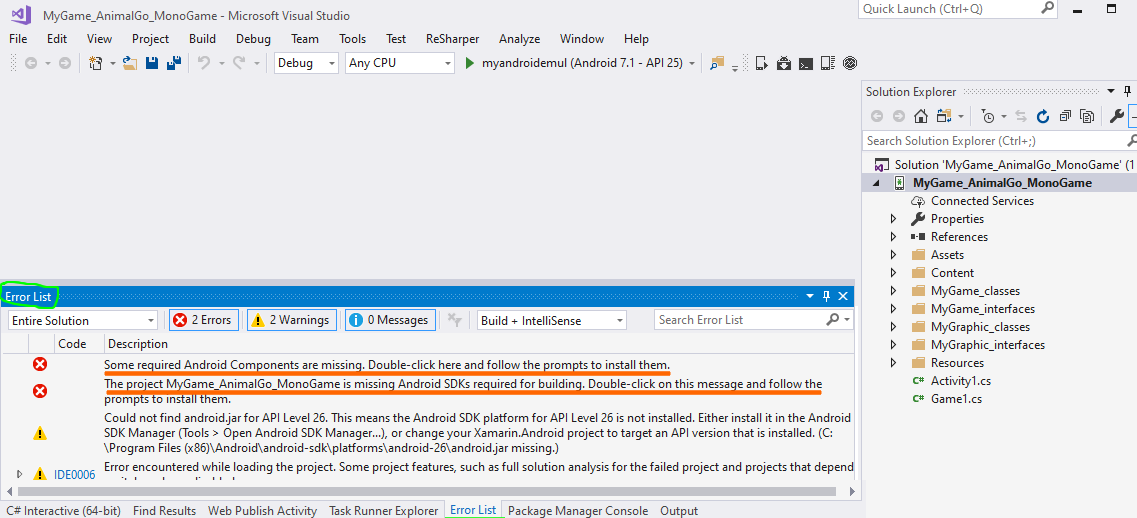
Page "Output"
Build info: Project 'MyGame_AnimalGo_MonoGame' requires the following components installed on your machine:
Android SDK Platform 26
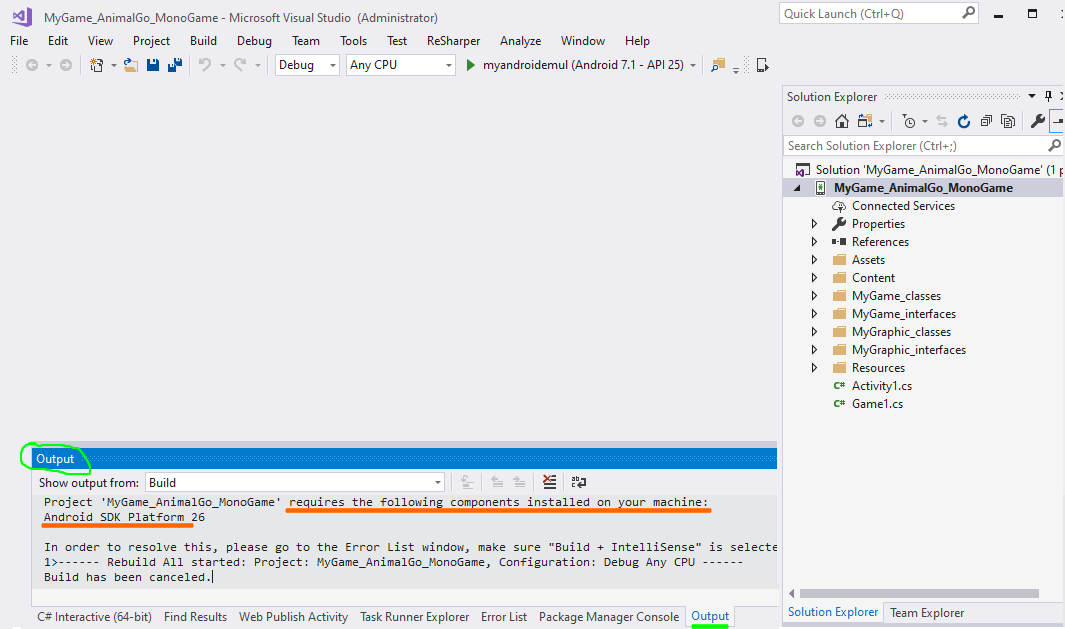
Решение: инсталируем Android 8.0 (SDK 26)
Для этого в Visual Studio 2017 нажимаем в меню: Tools → Android → Android SDK Manager...

Выбираем только 2 галочки:
[v] Android SDK Platform 26
[v] Source for Android 26
Видим проинсталировалось
Компилируем проект. Все хорошо. Ошибок нет.
 
← Previous topic
Running the MonoGame application on an Android phone (creating an apk file)
 
Next topic →
Create a Android virtual device in Visual Studio
 
Your feedback ... Comments ...
   
Your Name
Your comment (www links can only be added by a logged-in user)

Новость "Черная пятница" Dreame в Беларуси – две недели скидок до 3400 рублей
 
MonoGame
• What is MonoGame?
• What is Mono (Virtual Machine for C# on Unix) ?
• What are the advantages of Monogame?
• How to write a game in MonoGame and compile to different platforms: Windows computer, macOS computer, Android phone, iOS apple phone, Nintendo Switch game console
Download and install MonoGame
• Download and install Microsoft Visual Studio to write MonoGame games on a computer with the Windows system
• Open Visual Studio (to write a game using MonoGame)
• Installing MonoGame (download and install) for Windows inside Visual Studio
Create and run a MonoGame application on a computer (Windows) in Android emulator mode
• Create a new MonoGame application on the computer (Windows) in emulator mode Android
• Running and debugging the MonoGame app on your computer (Windows) in Android emulator mode
• Runs the old version of the MonoGame app in debug in Android emulator mode
• Running and debugging the MonoGame application on your phone via USB
• Running the MonoGame application on an Android phone (creating an apk file)
Android (install)
• Installing the Android Platform (SDK 7.1.1 API 25) in Visual Studio ...
• Create a Android virtual device in Visual Studio
Installing, running the MonoGame application on a computer with the MacOSX system
• Installing, running MonoGame application on a computer with the operating system iOS (MacOSX) using Xamarin Studio
• Installing, running MonoGame application on a computer with the operating system iOS (MacOSX) using Visual Studio
MonoGame Functionality
• How to Draw a Rectangle in the New MonoGame App
• Add a png file and draw a picture in the new MonoGame application
• How to draw text in the new MonoGame app
Books
• Books to learn MonoGame

  Ваши вопросы присылайте по почте: info@dir.by